
Join our Discord to discuss this article with fellow Duelists
Become a Patron to support us for 12 years of all-volunteer work
Do you have Neuron linked to your Konami Network Game Card?
North America has finally caught up to Europe and other countries for the integration of Yu-Gi-Oh! Neuron for Official Tournament Stores, Regionals, YCS, and WCQ events. This is going to be a small guide on how to properly link your Neuron and Konami Card Game Network account so you can play in any future tournaments. There are multiple ways to link your accounts, so we will be covering each way of how to link your accounts.
Konami IDs are important to the game, as they allow you to enter Yu-Gi-Oh! Events from the local OTS level to the Tier 2+ events as well. Without this ID, you are not permitted to participate in tournaments or side events if they’re hosted. This article is full of information for Yu-Gi-Oh! Neuron and what the app has to offer for players who currently haven’t downloaded it or players who haven’t used it for a while as a refresher.
What is NEURON?
NEURON is the Yu-Gi-Oh! TCG Official Companion App!
It has several features that support Duelists in the Dueling scene!
Introducing Yu-Gi-Oh! Neuron’s Features
- Deck Registration
-
- Easily register your Deck with your camera (with up to 20 cards readable at once!)
- Edit Decks with the refined interface
- Manage your Decks by linking to the Yu-Gi-Oh! Card Database
- Check the latest Forbidden & Limited List
- Simulate hands with a 5-card draw
- Share Decks using a single image or Deck Code
- Deck search
-
- Search among 400,000+ Decks created by Duelists worldwide (including public Descks for Yu-Gi-Oh! Duel Links and Yu-Gi-Oh! MASTER DUEL!)
- Search using extensive options, such as by cards included and categories
- Check the rankings for popular Decks
- Card Search (Yu-Gi-Oh! TCG & RUSH DUEL)
-
- Look up cards easily with your camera
- Conveniently search for cards using many conditions, such as card name, card text, and ATK/DEF
- View card text in 8 different languages
- Save cards to a Wish List
- Check cards’ info the day before they’re released
- Duel Support
-
- Utilize LP-calculation features, even in official tournaments
- Check the Card Q&A by searching using your camera
- Save Duel logs
- Flip coins, roll dice, and place counters
- Up your Dueling enjoyment with the BGM player
- Customize the visuals with designs from Yu-Gi-Oh! anime series
- Tournament Assistance
-
- Participate in events by showing your Card Game ID barcode
- Link with your Card Game ID
- Make entering events easier with 2D Barcodes and other entry methods
- Print Decklists at convenience stores using tournament formats
- Confirm/Manage My Tournaments
-
- View the tournaments you’ve played in and signed up for
- Facilitate your tournament experience, with info on opponents and seating
- Save Duel logs and Decks used to your Results
- Search Stores
-
- Search for Official Tournament Stores and view them on a map
- Check Official Tournament Store details and events
- Set your regular Official Tournament Store as your HOME Store/Favorite Stores
- Receive gifts at your HOME Store
- Search for Official Events
-
- Search for events and register to participate
- Check event details
- Add events to your Watch List
- See an overview of events at your HOME Store/Favorite Stores
- Results & Rankings
-
- Keep an orderly record of your event results and placements with the auto-save feature
- View rankings based on Ranking Points earned in events
- Profile
-
- Set your favorite card as your icon
- Earn achievements (such as through event tops and participation) and display them
- Follow your friends and favorite players to view their info and Decks
- Notifications/Product Information
-
- Check notices from KONAMI
Important information about NEURON
Ensure that your mobile device Operating System (iOS / Android) is up to date with the latest version.
Ensure that NEURON is up to date with the latest version
Ensure that you have internet access (Wi-Fi / Mobile)
Installing NEURON
You can find out more about NEURON here: https://www.konami.com/yugioh/neuron/en/
After downloading it from your App Store, you’ll go through the installation process.
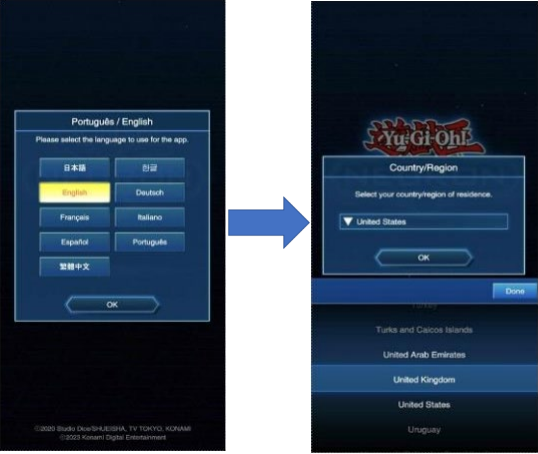
Start by choosing your language and country of residence and ensure that you select the right country. If you choose the wrong country, you’ll have to redownload the app.
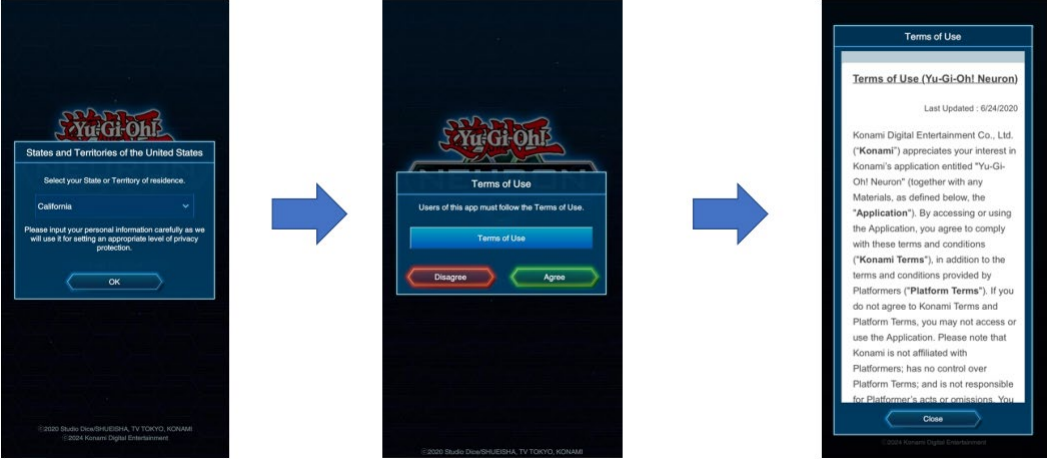
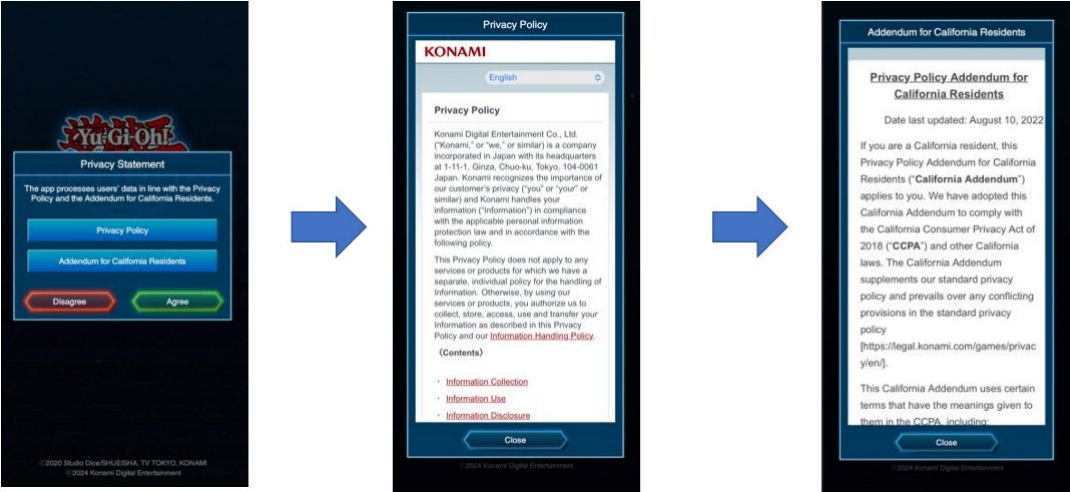
Next, you need to select the Game Title, Download Quality, and any other update to NEURON that may be prompted
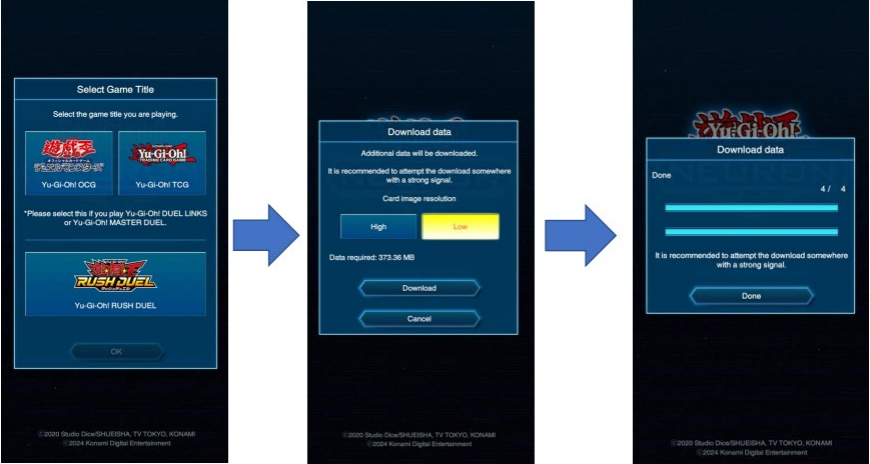
You can choose what settings you’ll use (Game Title, Card image resolution). Please note, not all features are available outside of Japan.
Downloading data internationally may be costly. Please ensure you do all necessary updates before travelling for your event.
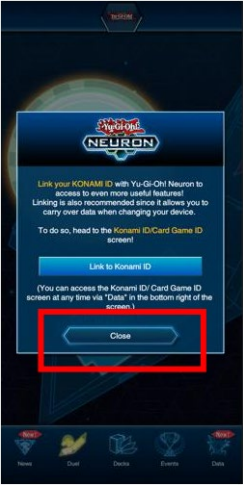
After installation and completing the tutorial, a popup will appear asking you to link your KONAMI ID, but please select “Close”.
About the KONAMI ID
A KONAMI ID is an ID that can be used for various online services proved by the Konami Group.
Registration is free of charge and can be made through “New Registration” on the My KONAMI website (https://my.konami.net) or in NEURON.
The most common uses of a KONAMI ID for Duelists are Yu-Gi-Oh! MASTER DUEL, Yu-Gi-Oh! DUEL LINKS, and YuGi-Oh! NEURON.
CARD GAME ID
A CARD GAME ID is used to play in a Yu-Gi-Oh! TRADING CARD GAME tournament. It can be connected to a KONAMI ID but is different than a KONAMI ID. Attaching your CARD GAME ID to your KONAMI ID allows you to use your existing CARD GAME ID in NEURON and on KCGN.
There are three ways to obtain a CARD GAME ID:
Application: Obtained by installing NEURON
Website: Obtained from registration at the Yu-Gi-Oh! NEURON (KONAMI CARD GAME NETWORK) or KCGN
Physical card: Obtained from the KONAMI CARD GAME NETWORK ID card. These cards are no longer distributed, but you can continue using the CARD GAME ID from a physical card if you have one.
Application: Obtained by installing NEURON
When NEURON is installed, a CARD GAME ID is always issued automatically.
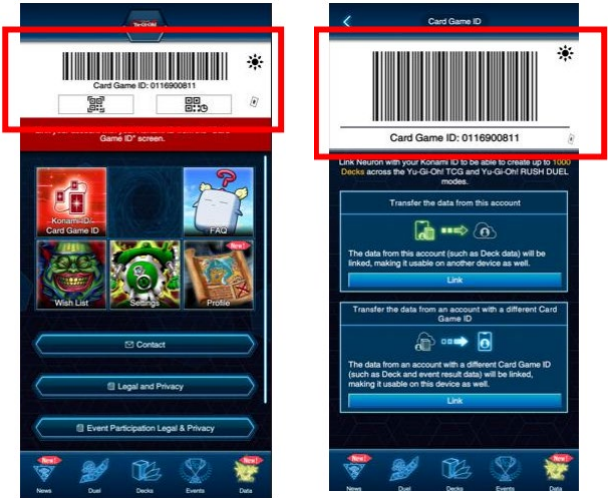
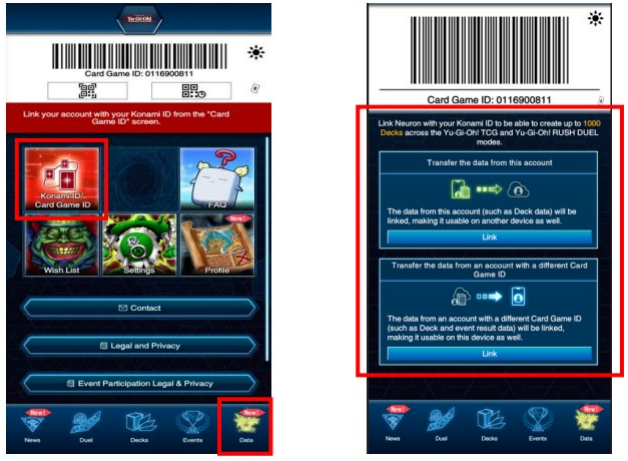
After starting NEURON, the new CARD GAME ID can be checked from the “Data” or “Konami ID/Card Game ID” pages.
Obtained from KCGN
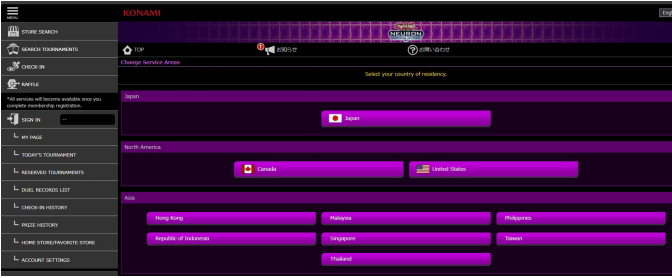
When an account on KCGN is created, you can obtain a CARD GAME ID on “My Page”. When you go to “My Page”, a “Card game ID registration” dialog appears. Click on the “New issue” button to be assigned a CARD GAME ID.
You can access the KCGN website at https://cardgame-network.konami.net/
Registration on KCGN requires a KONAMI ID.
Obtained from a KCGN ID card
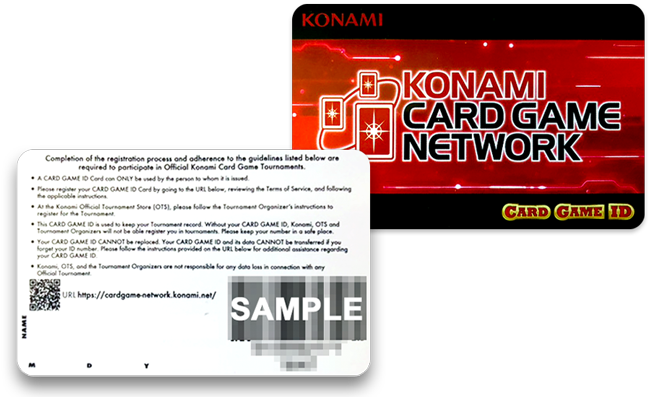
If you have a physical KONAMI CARD GAME NETWORK ID card, you can find the CARD GAME ID and password on the back of the card.
These cards are no longer distributed. If you do not already have a physical KCGN ID card, you will need to get a CARD GAME ID through NEURON or the KCGN site.
For Duelists that do not have a Card Game ID or a Konami ID
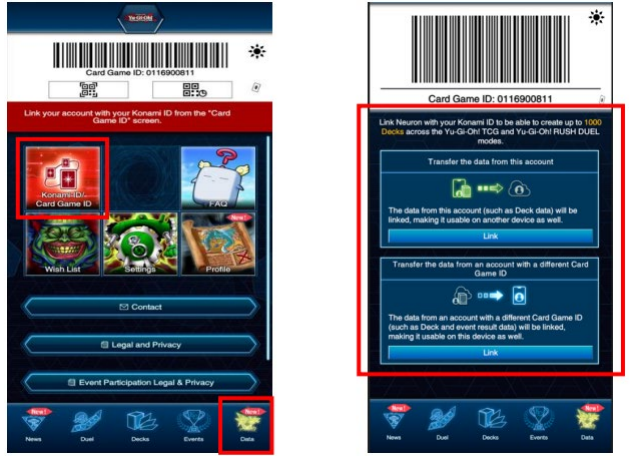
Start the NEURON app and tap on “Data”, then tap on “Konami ID/Card Game ID” to display the “Data Link” screen.
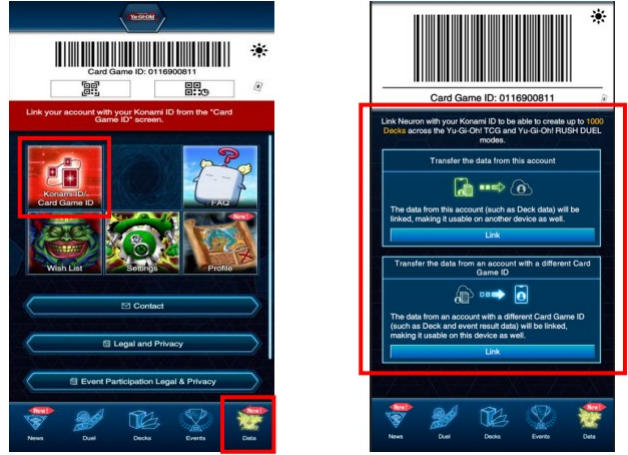
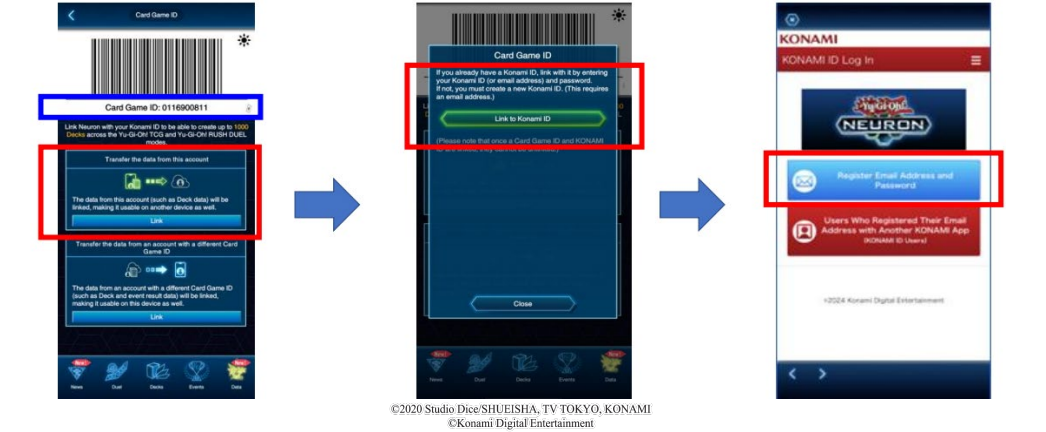
Select “Transfer the data from this account” -> “Link to a Konami ID” -> “Register Email Address and Password”
Create a KONAMI ID login with your email address. The CARD GAME ID associated with your KONAMI ID will be the CARD GAME ID shown in NEURON (an example is shown in the screenshot below with a blue border)
For Duelists that do not have a CARD GAME ID and do have a KONAMI ID
Start the NEURON app and tap on “Data”, then tap on “Konami ID/Card Game ID” to display the “Data Link” screen
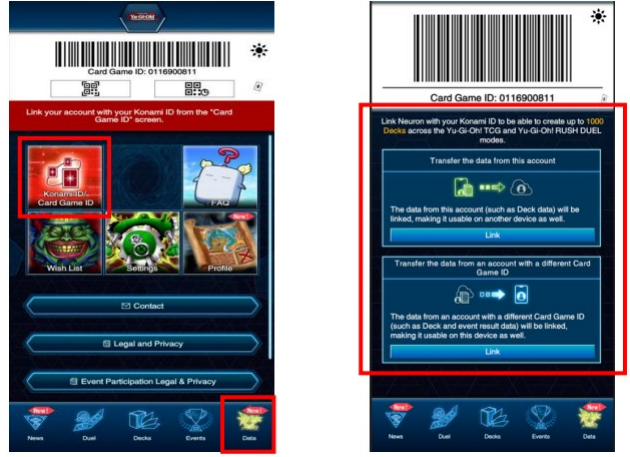
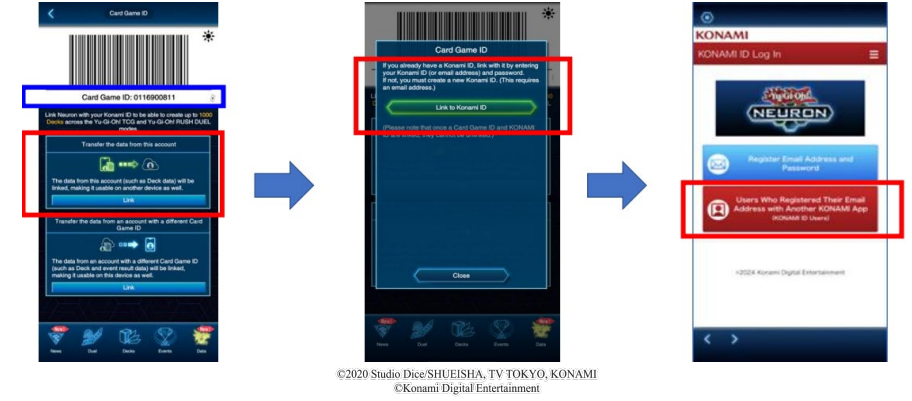
Select “Transfer the data from this account” -> “Link to a Konami ID” -> “Users who registered their Email address with another
KONAMI App (KONAMI ID Users)”
Login with the KONAMI ID login you wish to link. The CARD GAME ID associated with your KONAMI ID will be the CARD GAME ID
shown in NEURON (an example is shown in the screenshot below with a blue border)
For Duelists that have a CARD GAME ID and do not have a KONAMI ID
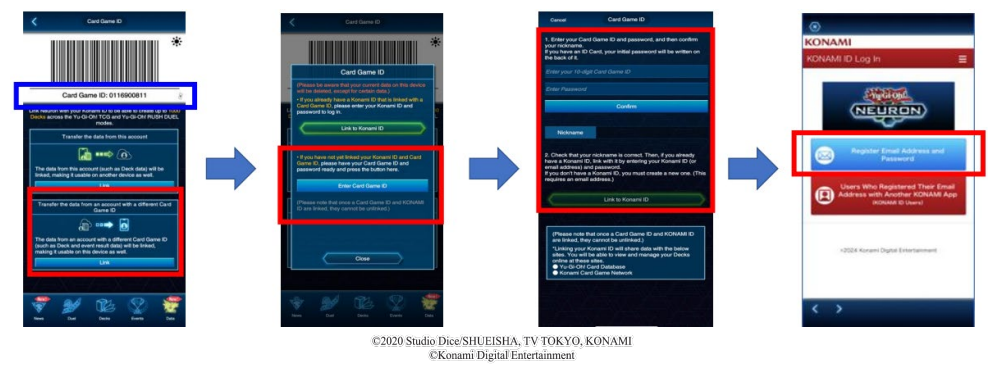
Start the NEURON app and tap on “Data”, then tap on “Konami ID/Card Game ID” to display the “Data Link” screen
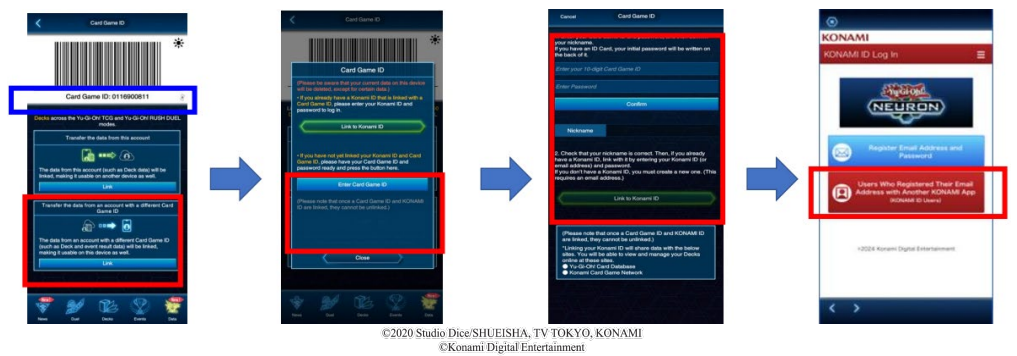
Select “Transfer the data from an account with a different Card Game ID” -> “Enter Card Game ID” -> On the “Card Game ID” page, enter the CARD GAME ID and the initial password on the back of the physical CARD GAME ID card -> “Link to Konami ID” -> “Register Email Address and Password”
Create a KONAMI ID login with your email address. The CARD GAME ID shown in NEURON (an example is shown in the screenshot below with a blue border) will be replaced when linking is completed.
For Duelists that have a KONAMI ID and have a CARD GAME ID on KCGN
Start the NEURON app and tap on “Data”, then tap on “Konami ID/Card Game ID” to display the “Data Link” screen
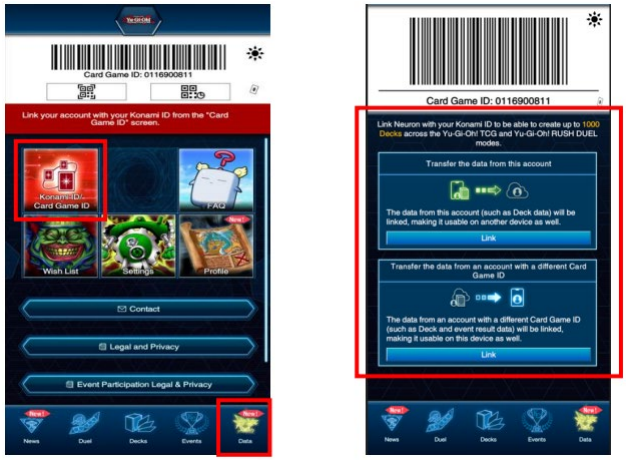
Select “Transfer the data from an account with a different Card Game ID” -> “Link to Konami ID” -> “Users Who Registered Their Email Address with Another KONAMI App (KONAMI ID Users)”
Login with the KONAMI ID login you wish to link. The CARD GAME ID shown in NEURON (an example is shown in the screenshot below with a blue border) will be replaced when linking is completed.
For Duelists that have a KONAMI ID and a physical CARD GAME ID card
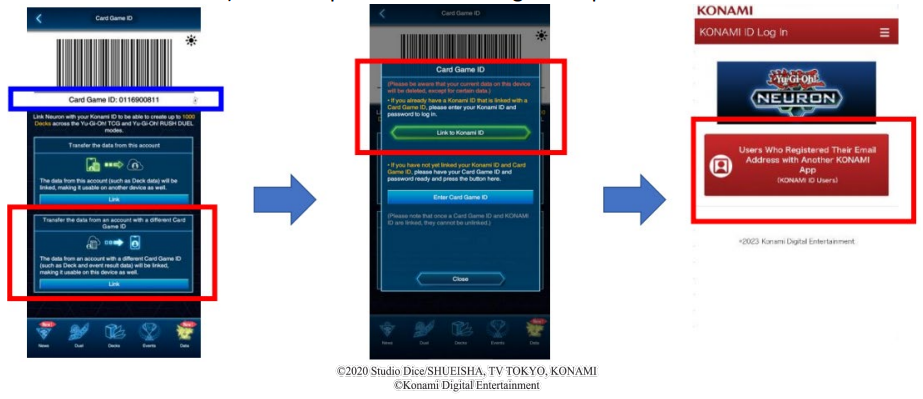
Start the NEURON app and tap on “Data”, then tap on “Konami ID/Card Game ID” to display the “Data Link” screen
Select “Transfer the data from an account with a different Card Game ID” -> “Enter Card Game ID” -> On the “Card Game ID” page, enter the CARD GAME ID and the initial password on the back of the physical CARD GAME ID card -> “Link to Konami ID” -> “Users Who Registered Their Email Address with Another KONAMI App (KONAMI ID Users)”
Login with the KONAMI ID login you wish to link. The CARD GAME ID shown in NEURON (an example is shown in the screenshot below with a blue border) will be replaced when linking is completed.
Frequently Asked Questions:
Q: NEURON displays an correct CARD GAME ID, but I’ve linked my existing CARD GAME ID. How do I fix this?
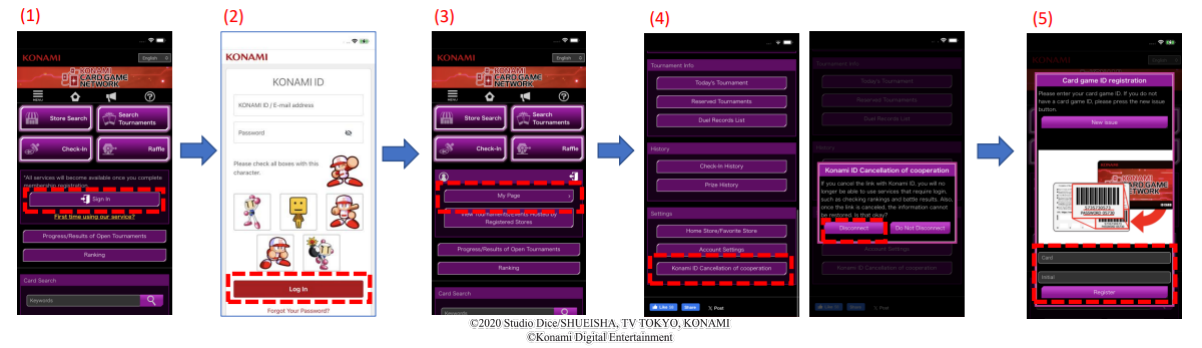
A: If the CARD GAME ID displayed in NEURON does not match what you have on your physical CARD GAME ID card, you may have linked another number by mistake and need to unlink it first. To do so, please follow these steps in a web browser:
- Access the KCGN page (https://cardgame-network.konami.net)
- Log in with your KONAMI ID
- Go to My Page
- Click/tap on “Konami ID Cancellation of cooperation” at the bottom of the screen, then “Disconnect” to unlink the incorrect CARD GAME ID from your KONAMI ID
- Enter the CARD GAME ID and password from your physical CARD GAME ID card
- Uninstall and reinstall NEURON
Q: I don’t have a CARD GAME ID or a KONAMI ID. How do I get these?
A: Once you install NEURON, you’re given a CARD GAME ID. You can then register for a KONAMI ID using your email address. The CARD GAME ID displayed in NEURON will then be your unique CARD GAME ID and is linked to your KONAMI ID.
Q: I can’t see the event in NEURON that I’m supposed to be playing in. How do I fix this?
A: Please ensure you have your Wi-Fi or mobile data on. If it is, the CARD GAME ID used to register for the event is not the same as the CARD GAME ID in NEURON. Please ensure your correct CARD GAME ID is attached to your KONAMI ID and loaded in NEURON.
Q: I have other questions not addressed here. How do I get help with my questions?
A: Please reach out to [email protected] for more assistance.
Q: I have encountered an error or bug. How do I report this?
A: Please reach out to [email protected] to report an issues, errors, or bugs you encounter.
Source: Official NEURON Linking PDF

Join our Discord community to discuss this article, share your thoughts, and connect with other fans.
Comments for this article are on Discord →